

Are you ready to supercharge your candidate communication game? Say hello to AI Assist, Oracle Recruiting Cloud 24C’s latest and greatest feature! This nifty tool is here to make your life easier by drafting personalized emails and text messages to candidates in no time. Let’s explore how AI Assist can transform your hiring process!
The Magic of AI Assist 🪄
Imagine this: you’re about to draft an email inviting a candidate to apply for a job, and you’re short on time. Enter AI Assist! This fantastic feature helps you draft emails and text messages quickly and professionally. Here’s the lowdown:
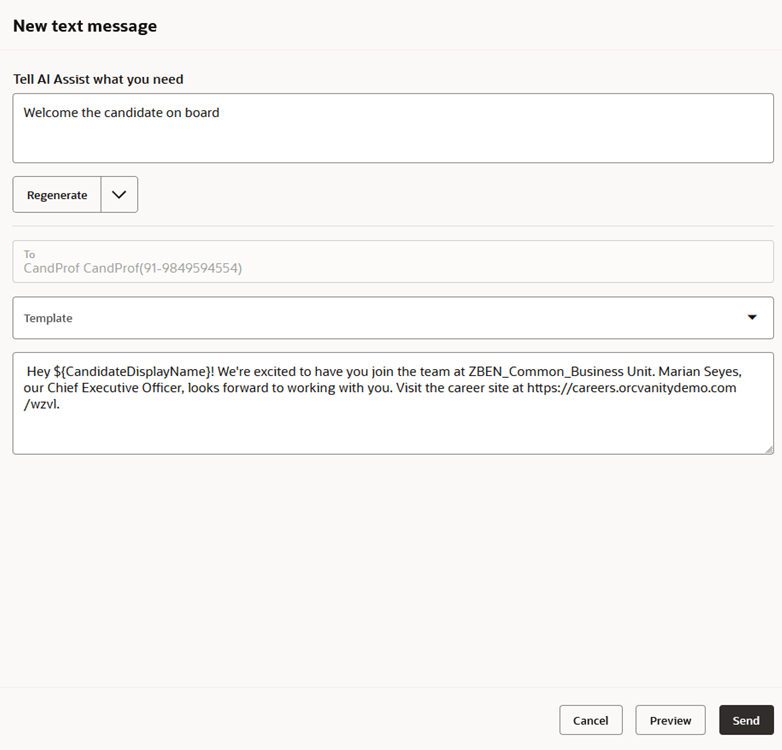
1. Tell AI Assist What You Need 🎤
Start by instructing AI Assist about the topic of your message. For example, “Tell the candidate about job openings in HR.”

2. Get Instant Content ⚡
AI Assist generates the subject and body of the email with spot-on content. You can tweak it, ask for a new version, adjust the length, or change the tone—whether you want it formal, friendly, or engaging. Plus, you can preview the content before sending it.

3. Craft Text Messages with Ease 📲
The same process works for text messages. You can change the tone but not the length, ensuring your messages are concise and effective.
Why You’ll Love AI Assist ❤️
- Personalized Touch: Effortlessly create personalized messages.
- Time Saver: Draft emails and texts in a jiffy.
- Enhanced Engagement: Customize tone and length to keep candidates engaged.
Use Cases: Where AI Assist Shines ✨
- Job Invitations: Instantly create professional and engaging invitations for candidates to apply for open positions.
- Interview Reminders: Send out friendly yet formal reminders to candidates about upcoming interviews, ensuring they don’t miss out.
- Follow-Up Messages: Easily follow up with candidates post-interview to keep them engaged and informed about the next steps.
- Onboarding Communications: Streamline the onboarding process by sending out well-crafted emails and texts to new hires, making them feel welcomed and valued.
- Job Offers: Draft compelling job offer emails that can be quickly personalized to make each candidate feel special and appreciated.
Additional Benefits of AI Assist 🌟
- Consistency: Maintain a consistent tone and messaging style across all communications.
- Efficiency: Reduce the time spent on drafting repetitive messages, freeing up more time for strategic tasks.
- Accuracy: Minimize errors in communication by using AI-generated content that is clear and concise.
- Flexibility: Adapt the tone and length of messages to suit different situations and audiences, from formal to friendly.
More AI Features in Oracle Recruiting Cloud 🤖
AI Assist is just one part of Oracle’s AI-driven approach to revolutionizing talent acquisition. Check out these other AI features that have been making waves:
- Similar Jobs: Enhance candidate engagement by suggesting roles similar to those they have shown interest in, encouraging a deeper exploration of opportunities.
- Time to Hire: Use AI to predict the recruitment duration for roles, offering valuable insights for better planning.
- Recommended Jobs: Personalize the candidate experience with AI-suggested positions that align with their profiles.
- Best Candidates: Prioritize recruiter decision-making by leveraging AI to suggest the most suitable candidates for a job.
- Similar Candidates: Aid recruiters by recommending potential hires that match a selected candidate’s profile, ensuring a quality candidate pipeline.
For an in-depth look at these features, check out my blog on Revolutionizing Talent Acquisition with Oracle Recruiting Cloud’s Adaptive Intelligence.
How to Get Started 🚀
Ready to unlock the power of AI Assist? Here’s how to enable it:
Step 1: Create the Profile Option
- Navigate to the Setup and Maintenance work area.
- Click the Tasks icon.
- Search for Manage Profile Options.
- Select the task from the results.
- On the Manage Profile Options page, click New.
- Enter the following:
- Profile Option Code: HCM_GENAI_IRC_COMPOSE_MESSAGE_ENABLED
- Profile Display Name: Enable AI Assist for messages
- Application: Recruiting
- Module: Recruiting Common
- Description: Enable AI Assist for composing emails or text messages
- Start Date: Today’s date
- Click Save and Close.
Step 2: Enable the Profile Option
- In Setup and Maintenance, search for Manage Administrator Profile Values.
- Select the task from the results.
- Search for HCM_GENAI_IRC_COMPOSE_MESSAGE_ENABLED.
- Set the profile level to Site.
- Set the profile value to Y.
- Click Save and Close.
Step 3: Grant Access to Recruiting
- In Setup and Maintenance, search for Manage Profile Categories.
- Select the task from the results.
- Search for ORA_FND_AUTH_REST_ACCESS.
- In the Profile Options section, click New.
- Select HCM_GENAI_IRC_COMPOSE_MESSAGE_ENABLED from the list.
- Click Save and Close.
Wrap Up 🎉
With AI Assist, your candidate communications will be faster, smarter, and more personalized than ever. Ready to see it in action? Dive into Oracle Recruiting Cloud 24C and let AI Assist work its magic!
For more information, check out the official Oracle Recruiting Cloud 24C Documentation.
Happy Recruiting! 🌟


Leave a Reply