

Hello, Oracle aficionados and functional consulting experts! Are you searching for that next big enhancement to elevate your Oracle Fusion HCM suite, especially around the Oracle Recruiting Cloud module? Well, the introduction of version 24B brings with it a fantastic new feature that’s set to revolutionize your recruitment approach: REPORTING FOR OUTBOUND MESSAGES. Dive with us into the details of this update, purposefully crafted to bolster your recruitment communications. Trust us, it’s as impressive as it promises to be! 🌈🚀
What’s Cooking? 🍳
In the bustling world of recruitment, communication is key. Recognizing this, Oracle has introduced a nifty feature allowing you to generate comprehensive reports for outbound SMS messages. This means you can now get a clear picture of your SMS outreach efforts – understanding what’s hitting the mark and what’s missing it. Here’s what you can do:

- Daily Reporting: Get an hour-by-hour breakdown of SMS messages sent versus blocked, complete with a cumulative count throughout the day.
- 30-Day Overview: A broader lens on your SMS performance over the past month.
- Historical Insight: Dive deep into your messaging strategy with data spanning the last two years.
Not just numbers, these reports come with a layer of categorization based on the notification categories defined in the Recruiting Content Library. From Candidate Verification Notifications to Event Canceled Notifications, you’re covered. And for everything else? There’s the Miscellaneous category.
Setting It Up Is a Breeze 💨
Ready to get started? Here’s how you can enable this feature:
- Navigate to the Setup and Maintenance work area.
- Select Offering: Recruiting and Candidate Experience.
- Choose Functional Area: Recruiting and Candidate Experience Management.
- Go to Task: Recruiting Messaging Configuration.
- Expand the Reports for Text Messages section and hit Edit.
- Simply select your desired reporting duration and click Create Report.
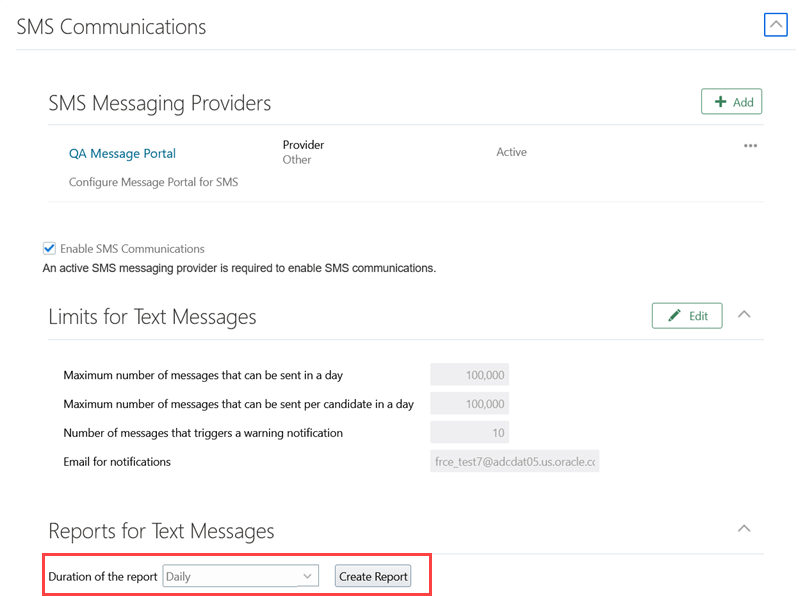
And voilà! You’re all set to create insightful reports using the Recruiting Message Configuration task.
Pro Tips to Keep in Mind 📝
Before you jump in, a couple of things to keep in mind:
- Ensure SMS communications are enabled to make full use of this feature.
This update is a testament to Oracle’s commitment to providing tools that not only simplify but also amplify the efficiency of recruitment processes. So, whether you’re an Oracle pro or just getting started, this feature is bound to make a significant impact on your recruiting strategy.


Leave a Reply